4.6 Summary screen
On the summary screen of the profile center, info on a user's request documents, documents on standby for approval, and notices are displayed.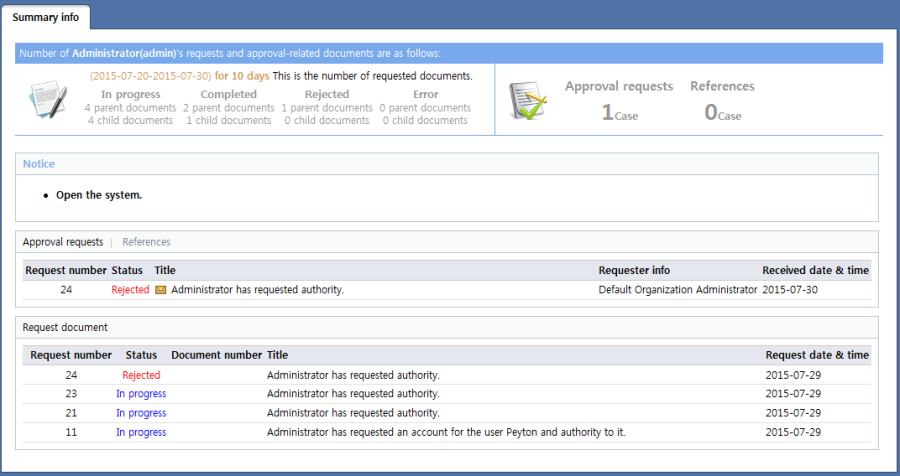
<Summary info screen>
Number of request documents by request status and number of documents awaiting approval
Above the summary information, the number of documents requested by the user during a certain period is displayed according to status, along with the number of documents awaiting approval/reference.
When approval/reference document count is clicked, the approval requests or reference document list page is brought up, respectively.
Notice
Notices are displayed. When the title of a notice is selected, the notice details page is brought up.
Approval requests and References
In Approval requests and References, the number of documents to be approved and referenced by a user is displayed. When approval requests and references are selected, approval requests or references are displayed, respectively. When an item is selected, the detailed info page for the selected approval requests/reference is brought up. The following items are displayed:
Request number: Displays the request number of the document
Status: Displays the status of a document awaiting processing
Title: Displays the document title. Above the title of the document, an icon indicating whether the document has been viewed is displayed.
 : Document is not read
: Document has been read.
: Document is not read
: Document has been read.Requester info: Displays the department and user name of the user who requested the document
Received date & time: Displays the date & time the request to process the document was received
Request document
The statuses for a certain number of documents requested by the user are displayed. When an item is selected, the detailed info page for the selected request document is brought up. The following items are displayed:
Request number: Displays the request number of the document If a child document of the document exists, the + button can be clicked to display info on the child document.

Status: Displays the status of a document awaiting approval. If a child document exists, the progress of the child document is indicated beneath status.
Document number: Displays the document number
Title: Displays the document title. Underneath the document title, the number of child documents according to status is displayed if a child document exists.
Request date & time: Displays the request date & time of the document