4.1.2.33 User's system account network info update request
When User's System Account Network Info Update Request is selected in the request list, the following screen is brought up: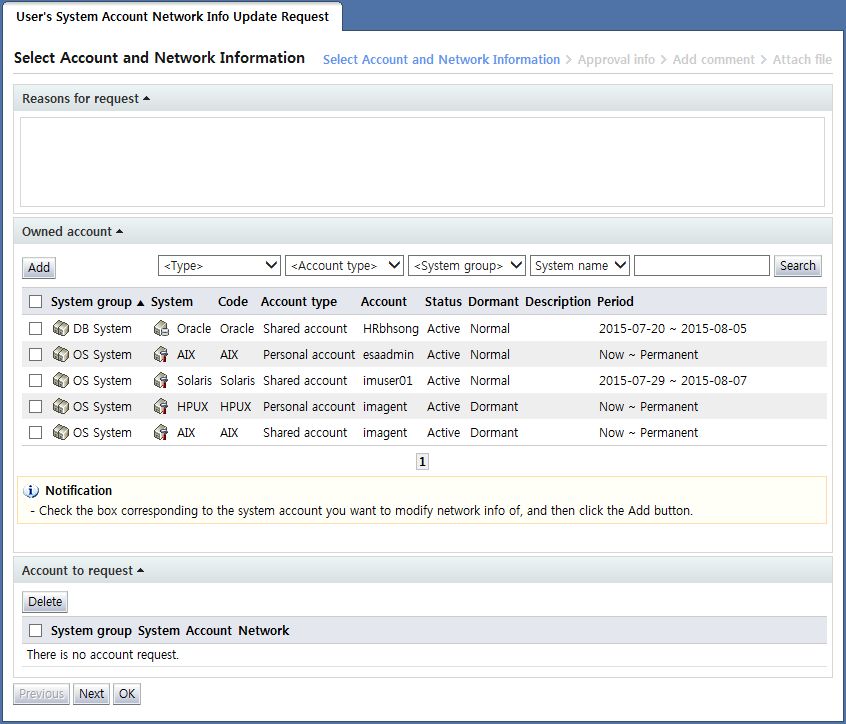
<User's system account network info update request>
User's system account network info update request is a form used to file a request for the update of access network info used when using system accounts owned by a user.
In this form, network info only for system accounts (including personal and shared accounts) owned by the requester can be edited.
In the "Select Account and Network Information" stage, the account for which access network info will be updated is selected by the requester.
In the "Owned account" area, a list of system accounts owned by the requester is shown.
Here, select the system account item for which network info will be updated and click the "Add" button.
When an item is added, the network info that can be used in the account is displayed in the "Account to request" area as shown below.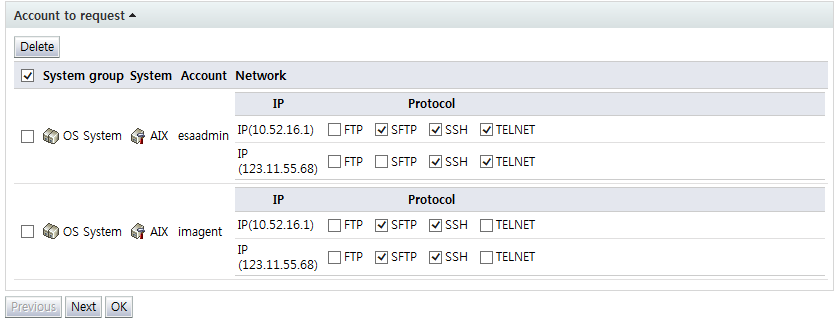
<Account to update network info>
In added accounts, select the network info to be used for each account.
To delete an account from Account to request, select the checkbox of the account and click the "Delete" button.
Note that, since network info may vary by system, the screen shown may not be completely identical to the screen shown above.
This is because different systems may have different network control methods.
If the network control type is IP-protocol, and the user is using multiple IPs, the network info that can be selected in that account will be shown as follows:
<IP-protocol type network control for a user with multiple IPs>
If the network control type is IP, and the user is using multiple IPs, the network info that can be selected in that account is shown as follows:
<IP type network control for a user with multiple IPs>
If the network control type is protocol only, the network info that can be selected in that account is shown as follows:
<Protocol type network control>
After entering request info, click the "Next" button and enter additional approval info.