4.2.2 Delegate approval
In Delegate approval, a function through which a user who is unable to approve documents for a certain period can designate another user to perform delegated approval during a certain period is provided. When delegate approval is clicked in delegation management, the following screen is brought up: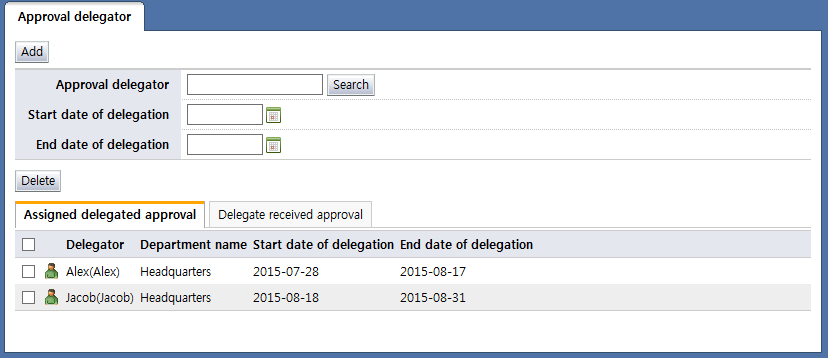
<Approval delegator>
On the approval delegator screen, the approval delegator user can be selected by clicking the "Search" button. Approval delegators can be added by selecting a user, and then setting the start date and end date of delegation. When adding approval delegations, if a period overlaps with an existing delegated approver, the following warning window is displayed, and the approval cannot be delegated: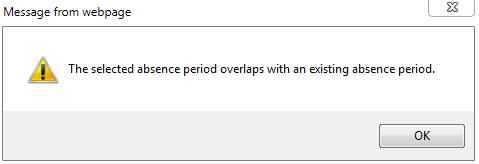
Added delegators can be viewed in the "Assigned delegated approval" tab.
Select: Select the checkbox and click the "Delete" button to delete an approval delegator.
Delegator: Displays the name of the user who has delegated approval
Department name: Displays the name of the department where a user who has delegated approval belongs
Start date of delegation: Displays the date a delegator can start delegating approval
End date of delegation: Displays the end date of approval delegation by a delegator
Each of the items in the "Assigned delegated approval" tab list is described below.
<Delegate received approval>
Delegated user: Displays the name and login ID of the user who has delegated approval to a user
Department name: Displays the department of the user who has delegated approval
Start date of delegation: Displays the start date of the approval delegation assigned to the user
End date of delegation: Displays the end date of the approval delegation assigned to the user