4.1.2.42 User's personal system account role change request
When User's Personal System Account Role Change Request is selected in the request list, the following screen is brought up: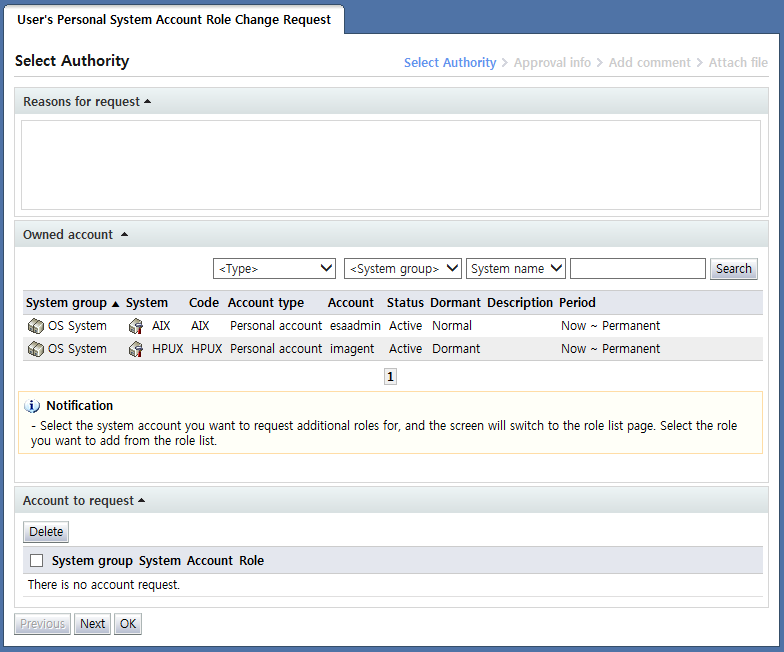
<User's personal system account role change request>
User's personal system account role change request is a form used to request changes to the roles of personal system accounts of the requester.
Using this form, changes to roles in the personal system accounts of the requester can be requested. Requests for role changes for shared accounts and managed accounts used by the requester cannot be made.
Role change requests are characterized by the deletion of role info in the existing account when approval is completed. The deleted info is changed to the requested role info.
In the "Select account" step, the account for which role addition is requested is selected among the personal system accounts of the requester, along with the role to be modified.
In the "Owned account" area, a list of personal system accounts managed by the requester is shown.
Here, when the item for the account for which the addition of roles is requested is selected, the following screen is brought up: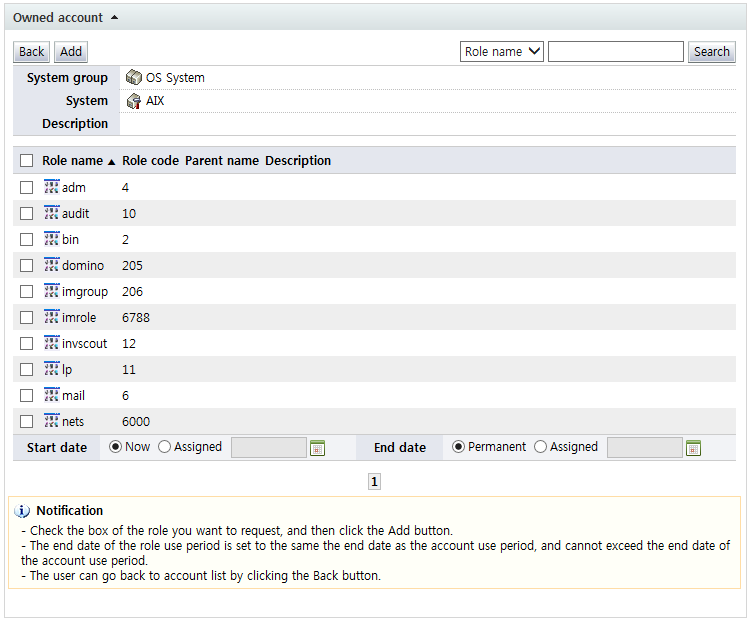
<List of requestable roles of an account for which role change will be requested>
In the list of roles above, the roles that can be requested in the account are displayed. When a role to be used by the account is selected, and the "Add" button is clicked, account info and role info are added to the "Account to request" area as shown below.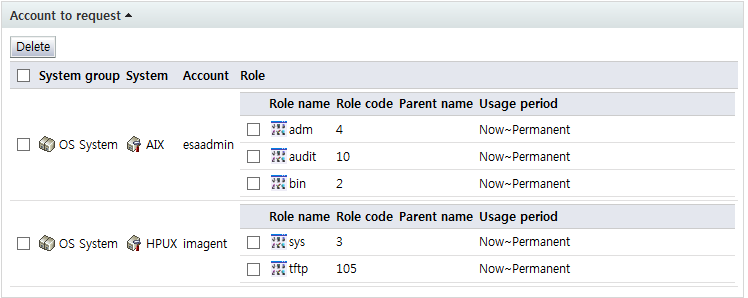
Likewise, in the "Owned account" area, when the "Back" button is clicked, a list of personal accounts is brought up, and the roles of other accounts may be requested additionally.
Note that, when adding a role, the usage period of the role cannot exceed the end date for the usage of the account for which the request will be made.
In other words, a role for which change is requested is subordinate to the usage period of the account, and the change cannot be requested past the usage period.
To delete an account from the "Account to request" area, check the checkbox for the account and click the "Delete" button. To exclude a role from the roles to be added, select the checkbox of the item and click the "Delete" button to delete the role.
After entering request info, click the "Next" button and enter additional approval info.