4.3.2.3 Sent
The Sent is a box where sent and received documents are saved after completion of internal approval in one department and being sent to another recipient department. When Department Documents > Sent is clicked, the following screen is brought up: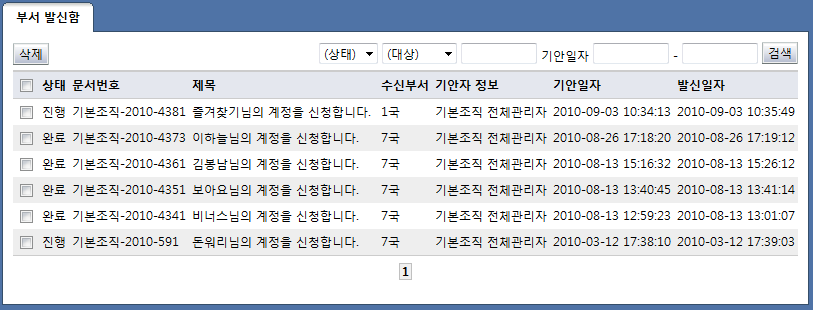
<Sent list>
The items in the list of sent are described below.
Status: Displays the status of the document.
In progress: Document whose approval is in progress
Returned: A sent document that has been returned
Completed: A document whose approval has been completed
Document number: Displays the document number When the document number is clicked, the document details page is brought up.
Title: Displays the document title. When the title of a document is clicked, the document details page is brought up.
Recipient department: Displays the name of the department that received the document
Requester info: Displays requester info
Request date & time: Displays the request date & time
Date & time sent: Displays the date the document was sent
By clicking the buttons on the top of the view sent box list page, the following tasks can be performed:
Search:
Document status
In progress: Document whose approval is in progress
Returned: A sent document that has been returned
Completed: A document whose approval has been completed
Search target
Title: Search for documents whose title includes a word.
Requester: Search for requester names that include the search word.
Document number: Search for document numbers that include the search word.
Request date & time: Search for documents requested in the designated period.
If the title or number of a document is selected, the following screen is brought up, and the document details can be viewed: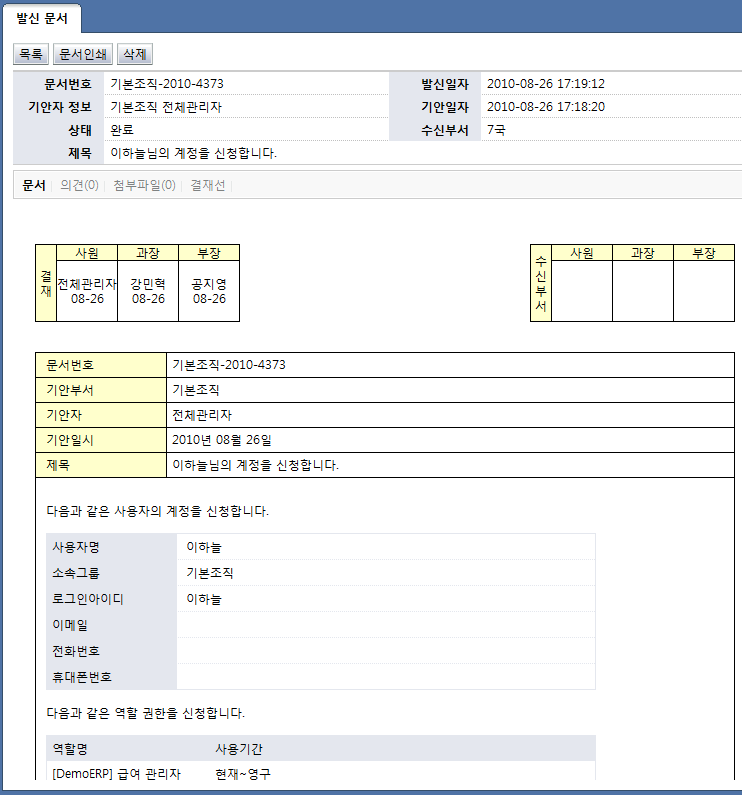
<View sent document details>
The attribute items of requests are described below.
Document number: Displays the document number
Date & time sent: Displays the date the document was sent
Requester info: Displays requester info
Request date & time: Displays the request date & time
Recipient department: Displays the name of the department that received the document
Title: Displays the document title.
The menus associated with the document are explained below.
Document: Displays the content of the approval requests.
Comment: Displays the comments attached to the document.
Attachment: Displays the files attached to the document. When the title of an attachment is selected, the file can be downloaded.
Approval stages: Displays the status of the current approval stage in progress for the document.
Document log: Displays the log of the document.
By clicking the buttons on top of the document, the following tasks can be performed:
List: Brings up the view requests list page.
Delete: Delete a sent document.
Print document: The content of the approval requests is printed.