4.1.2.38 System managed account password reset request
When System Managed Account Password Reset Request is selected in the request list, the following screen is brought up: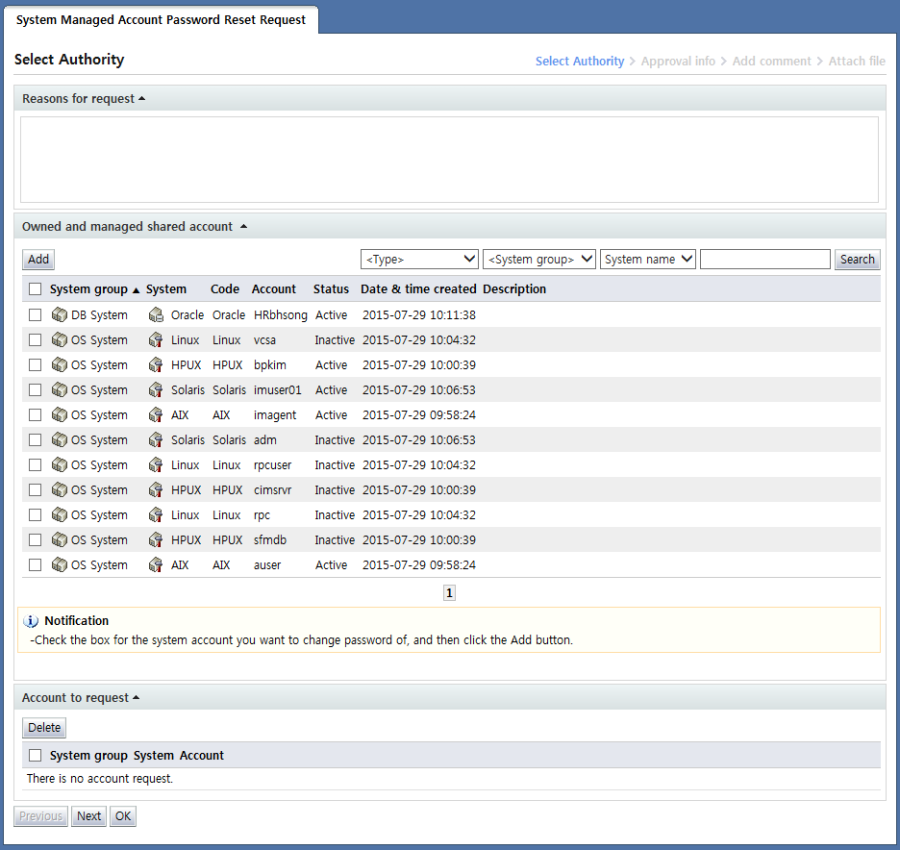
System managed account password reset request is a form used when resetting the password of a shared system account managed by the requester.
In this form, passwords can be reset only for shared system accounts managed by the requester. Passwords for personal accounts of the requester cannot be reset.
Once a request is approved, the system account password is changed to a random string in the server. The generated random strings are sent to account admins and admin users through email.
In the "Select account" stage, the account for which the user will change the password is selected.
On the screen for this step, a list of shared accounts managed by the requester is displayed in the "Owned and managed shared account" area.
Here, select the system item for which the password is to be reset and click the "Add" button.
When items are added, the accounts for which the password is to be reset are added to the "Account to request" area as shown below.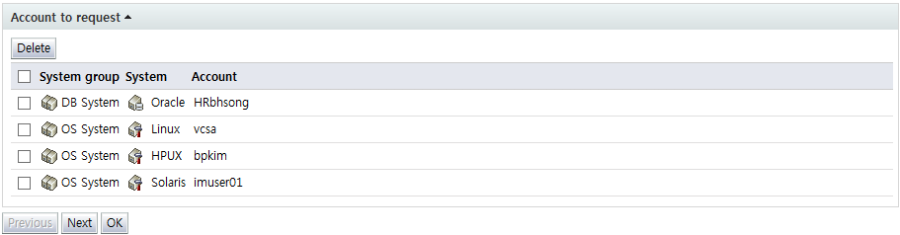
To delete an account from Account to request, select the checkbox of the account and click the "Delete" button.
After entering request info, click the "Next" button and enter additional approval info.