4.1.2.6 _System owned authorities - Add_
When User's System Authority Request form is selected, the owned authorities of the requester can be viewed as shown below.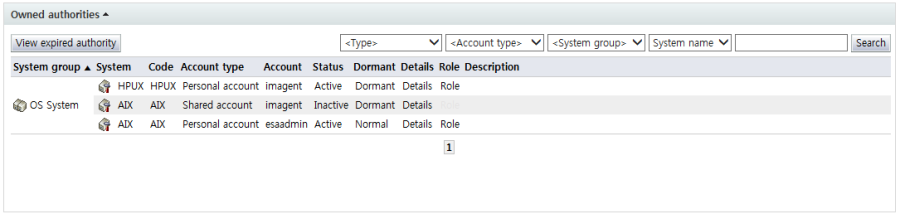
<Owned authorities>
In owned authorities, info on system accounts currently owned by the requester can be viewed.
Each of the items is described below.
System group: Displays the system group
System: Displays the system name. The icons denote the system types. The icons signify the following:
 : OS
: OS-
: DBMS
-
: Network equipment
Code: Displays the system code
Account type: Displays the type of the account
Personal account: An account that only an individual can use
Shared account: An account used jointly by multiple persons
Account: The account name is displayed.
Status: Displays the enabled or disabled state of the account
Dormant: Indicates the normal/dormant status of the account
Details: Brings up the detailed info screen for the account
Role: If the account has role authorities, the "Role" item is enabled. When the "Role" item is selected, a screen where the roles of the user in the system can be viewed is brought up.
Description: Displays a description of the system
The following is the screen brought up when detailed account info is selected: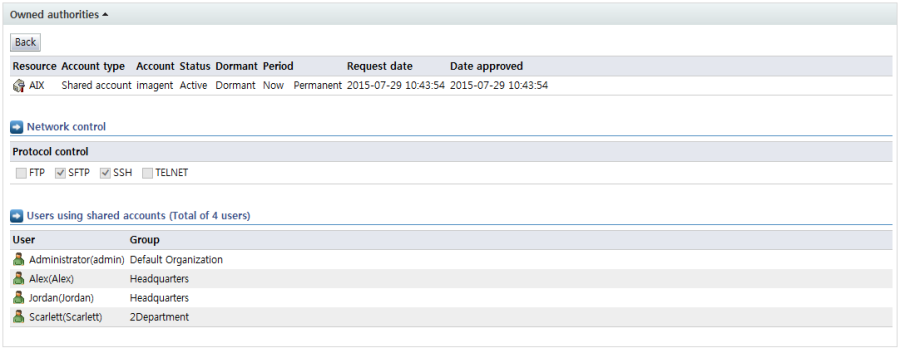
<Detailed account info>
Under system details, three major items are displayed.
System info: Displays detailed info for the system account
Resource: Displays the system name and type
Account type: Indicates the account type, i.e., personal or shared
Account: Displays the name of the account used
Status: Displays the status of the account
Dormant: Indicates whether the account is normal or dormant
Period: Displays the account usage period
Request date: Displays the date & time of account use request
Date approved: Displays the date & time of account use approval
Network control: Displayed only if the system is synced with network access control. In network control, the IP and protocol that can be used when accessing the system are displayed.
Users using shared accounts: If the account is a shared account, info on the users using the account is displayed.
When the system roles item is selected, a list of roles assigned to the system account can be viewed. The following is the screen brought up when enabled role items are selected: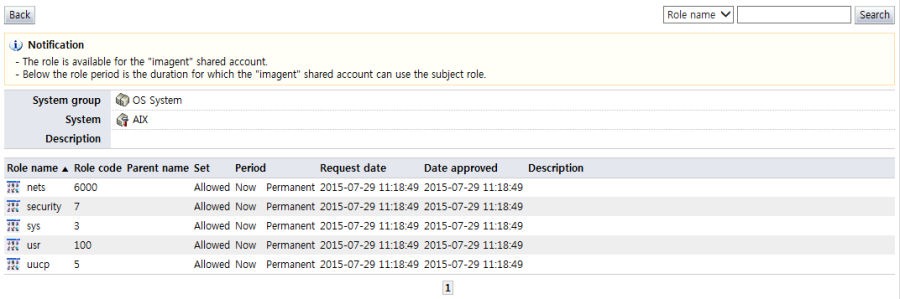
<System role>
In the system roles list, the roles assigned to the account can be viewed.
The items in the roles list are described below.
Role name: Displays the name of the assigned role
Rold code: Displays the assigned role code
Parent name: Displays the parent name of the assigned role. The parent name is shown only when the role structure of the system is hierarchical.
Set: Indicates whether the assigned role is allowed or deny authority. If set as a deny authority, the authority cannot be used.
Period: Displays the usage period of the assigned role
Request date: Displays the date & time the role was assigned
Date approved: Displays the date & time the assigned role was approved
Description: Displays a description of the role
When the "View expired authority" button is clicked in Owned authorities, the following screen is brought up (expired authorities can be viewed on the screen):
<View expired authority>
Type: Displays the system type
-
: OS
-
: DBMS
-
: Network equipment
-
: Role authority
System group: Displays the system group
System: Displays the system name. The icons denote the system types. The icons signify the following:
Name of authority: Displays the name of authority In other words, the system name or role name is displayed.
Code: Displays the system code
Parent name: If the authority is a role authority, and it has a hierarchical structure, the parent name is displayed.
Account type: Displays the type of the account
Personal account: An account that only an individual can use
Shared account: An account used jointly by multiple persons
Account: The account name is displayed.
Usage period: Displays the usage period of the authority
Request date: Displays the date & time the authority was requested
Date approved: Displays the date & time the authority was approved
Description: Displays a description of the authority